macOS · Metadata Sanitizer · $1.99 lifetime

Every photo you share files a report on you.

Where it was taken. When. On what device. It's all written invisibly inside the file — and anyone you send it to can read it. MetaLume shows you everything, then wipes it in one click. Entirely on your Mac. Never in the cloud.

FREE TO INSPECT 100% OFFLINE NO SUBSCRIPTION 15 LANGUAGES
FormatsJPGPNGHEICTIFF
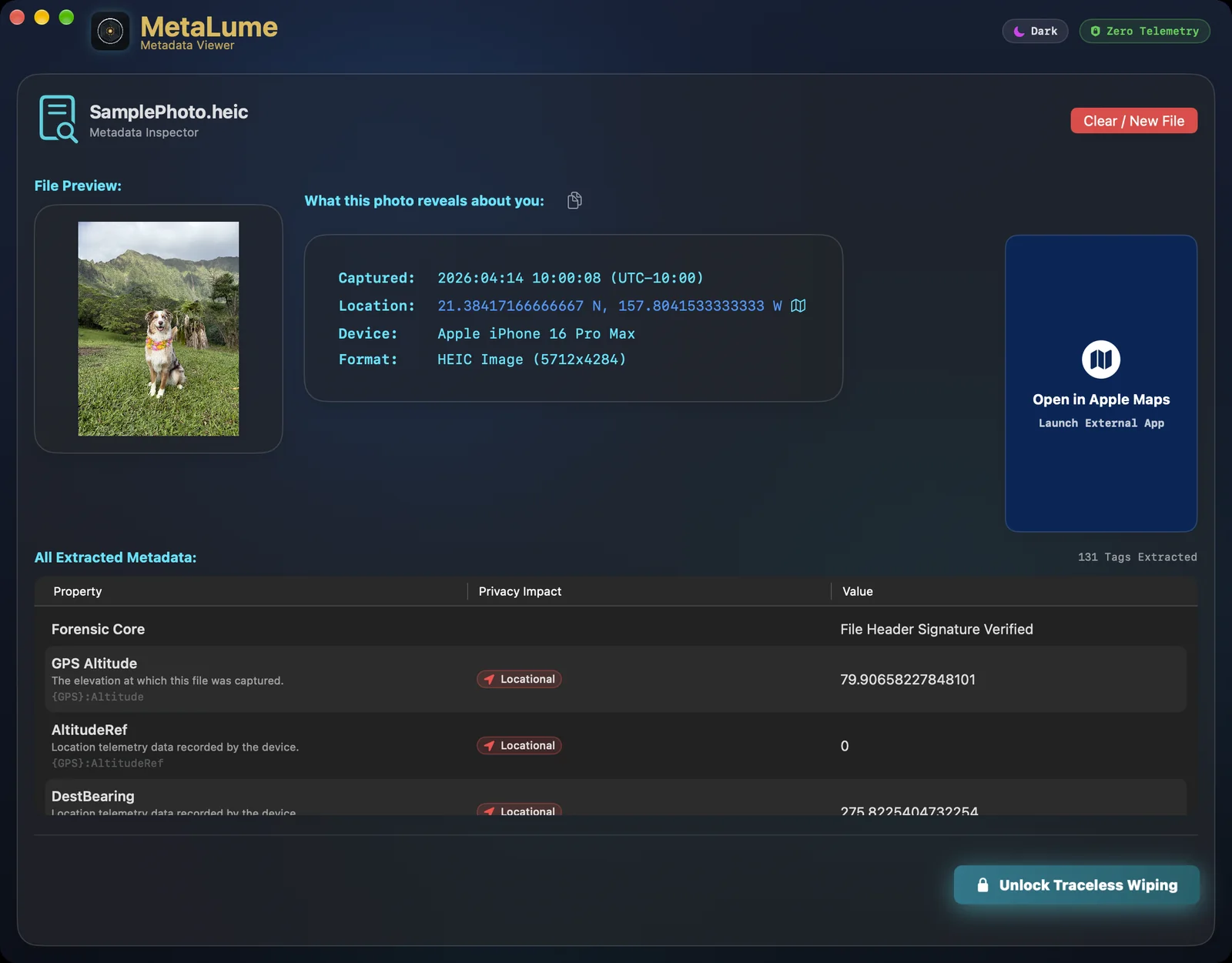
MetaLume metadata inspector revealing hidden GPS coordinates, capture time, and device model inside an ordinary photo
01What your camera writes down

The photo is the postcard.
The metadata is the envelope it came in.

Every modern camera embeds an invisible record — called EXIF metadata — inside each image file. It never shows up on screen, it survives most sharing, and it takes about four seconds for anyone to extract.

For a typical iPhone photo, that record includes your GPS position to within a few meters, the precise second of capture, and the exact hardware that took it.

SPECIMEN — IMG_2841.HEICEXPOSURE ANALYSIS
GPSLatitude34.019486 N
GPSLongitude118.491214 W
DateTimeOriginal2026:06:27 14:12:09
Make / ModelApple iPhone 16 Pro Max
SoftwareiOS 26.5
LensModelback triple camera 6.86mm
ColorSpaceDisplay P3
Selling furniture online? The listing photo can carry your home coordinates.
Posting vacation pictures? Timestamps announce exactly when your house is empty.
Sharing kids' photos? School runs and playgrounds become mappable patterns.
02Live demonstration

Don't take our word for it. Scrub one yourself.

Pick a sample — or drop one of your own photos and watch its real hidden data appear. This page reads it the same way the app does: locally. Nothing you drop here leaves your machine.

MetaLumeMetadata Inspector — web demo
ZERO TELEMETRY · IN-BROWSER
Specimen
Beach day
City brunch
Trail summit
TRACELESS
Drop your own photo or click to browse —
see what your pictures are really carrying
FILES ARE READ LOCALLY IN YOUR BROWSER — NOTHING UPLOADS
FormatsJPGPNGHEICTIFF
Extracted metadata
IMG_2841.HEIC
✓ SANITIZED — 0 METADATA FIELDS REMAIN
The Mac app does this to your actual files — losslessly. Get MetaLume free
03The whole workflow

Three moves. Ten seconds.

FREE STEP — 1

Drop a photo in

Any JPG, PNG, HEIC, or TIFF. No account, no setup — the window is the whole interface.

FREE STEP — 2

Read the report

Every hidden field, laid bare — GPS pin on an actual map, timestamps, device signature, file integrity check.

STEP — 3

Export a traceless copy

One click writes a pixel-identical copy with zero metadata. The original stays untouched.

04Under the hood

Friendly on the surface.
Forensic underneath.

MetaLume applies the same discipline used on professional evidence benches — then hides all of it behind one button.

Zero network activity

The app has no internet connection to use. No telemetry, no analytics, no cloud, no account — it physically cannot phone home.

// sandboxed · zero third-party APIs

Lossless scrubbing

Exports keep the original resolution, color profile, and sharpness. Only the invisible payload is removed — never the pixels.

// native Apple ImageIO pipeline

Magic-byte verification

Reads the file's true hex signature to catch impostors — like an executable renamed to .jpg — before you ever double-click it.

// header signature analysis

Cryptographic receipts

SHA-256 fingerprints of the original and the clean copy, generated in real time — proof of exactly what changed and what didn't.

// chain-of-custody hashing

Time-stomp protection

Even filesystem dates can betray you. Exports get a neutral baseline timestamp instead of your real creation and modification times.

// unix flag reset on export

Native and instant

Built in Swift for macOS — no Electron shell, no bundled interpreters. It opens before your coffee hits the desk.

// Mac App Store sandboxed
05The instrument itself

Built to look at home next to your other Mac apps.

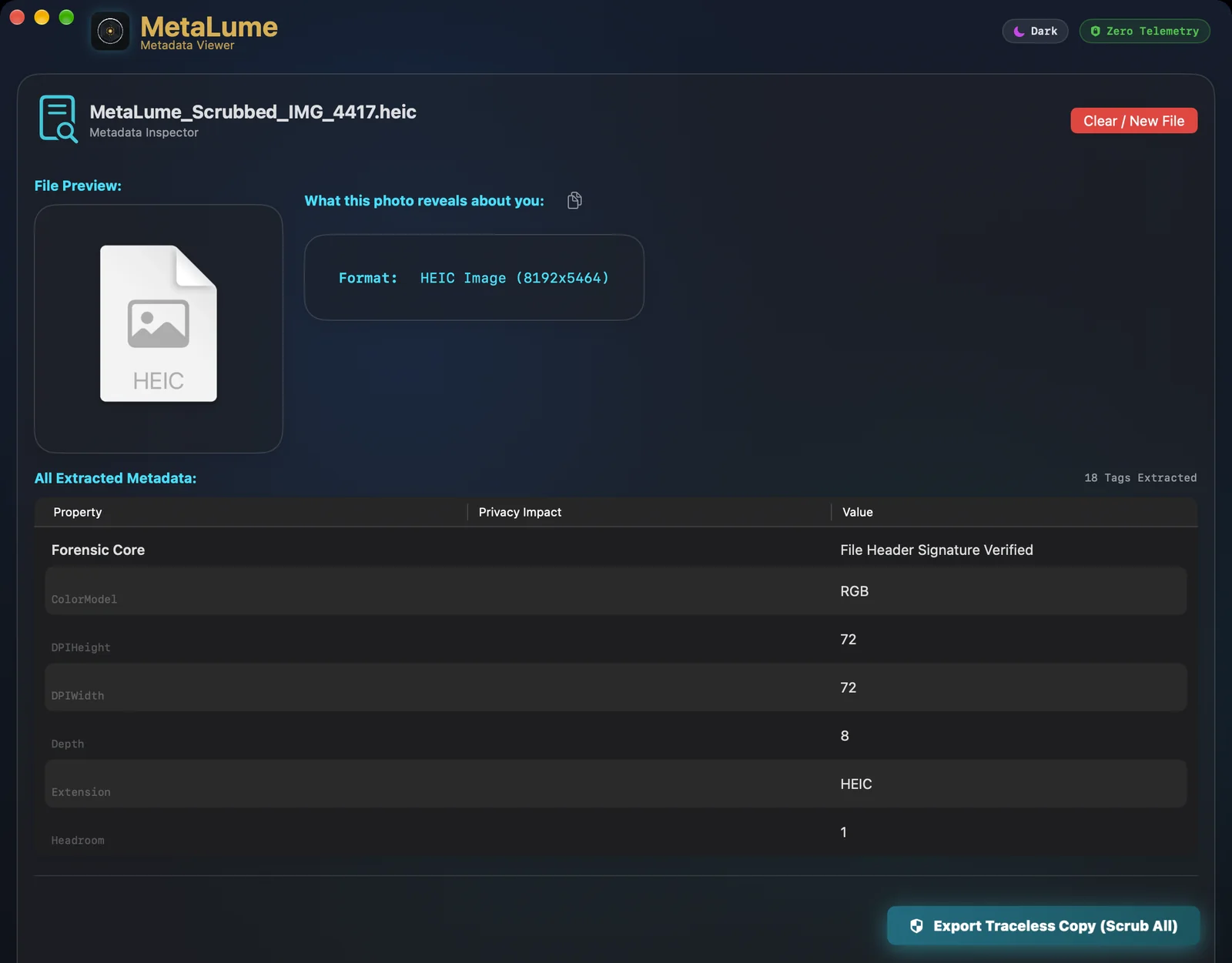
A scrubbed photo in MetaLume: only format information remains after export
After the scrub — nothing left to read
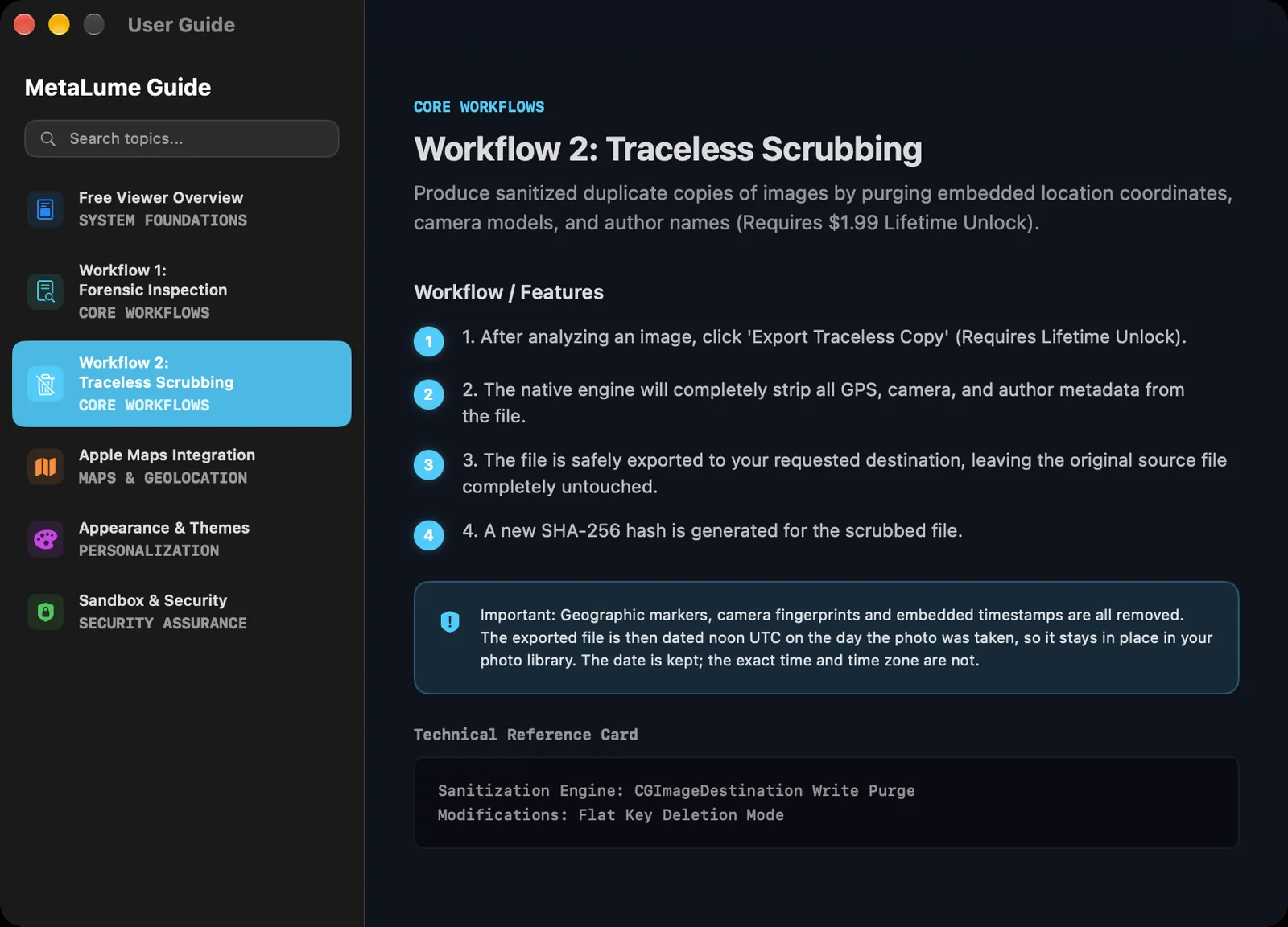
MetaLume's built-in user guide window
A real manual, built in — no web docs
Full metadata inspection view with map preview and Exif table
The inspector — free, unlimited, forever
06What it teaches

A privacy tool that doubles as a forensics classroom.

MetaLume shows its work. Every inspection walks through the same concepts taught in computer-science and digital-forensics courses — demonstrated on your own photos.

EXIF · TIFF

Metadata anatomy

Every camera writes a hidden record in standardized EXIF and TIFF fields. Inspecting real photos shows exactly what gets stored, where it lives inside the file, and why it survives sharing.

// GPSLatitude · DateTimeOriginal · LensModel · OwnerName
Magic bytes

File signatures

An extension is just a label — the first bytes of a file tell the truth. MetaLume reads these magic bytes the way forensic scanners do, catching files that pretend to be something they're not.

// FF D8 FF → JPEG  ·  89 50 4E 47 → PNG
SHA-256

Cryptographic fingerprints

A SHA-256 hash gives every file a unique fingerprint. Change a single byte and the fingerprint changes completely — the principle behind evidence integrity and chain of custody.

// 1 byte changed → 100% new fingerprint
07Pricing

One price. Once.

No subscription, no tiers, no "premium plus". Inspecting is free forever; a single $1.99 purchase unlocks scrubbing for life.

Inspector
$0 — free forever
Download and use daily. No account, no trial clock.
  • Unlimited metadata inspection
  • GPS locations plotted on Apple Maps
  • Magic-byte fake-file detection
  • SHA-256 file fingerprints
  • Traceless scrubbed exports
Download free
NOT A SUBSCRIPTION
Lifetime unlock
$1.99 — one time, ever
Single in-app purchase inside the free download.
  • Everything in Inspector, plus:
  • Export Traceless Copy — full one-click scrub
  • Unlimited scrubs, forever
  • Timestamp protection on every export
  • All future updates included
Get the app → unlock inside
08From the same bench

MetaLume protects your photos. MetaWrite runs the lab.

When the job outgrows a single image — legal discovery, forensic casework, whole directories of mixed documents — our flagship MetaWrite takes over: 50+ formats, batch pipelines, full tag authoring, and court-ready compliance certificates.

Same zero-telemetry engineering. Considerably bigger toolbox.

Explore MetaWrite ↗
CapabilityMetaLumeMetaWrite
workloadPhotos & imagesEnterprise documents
formatsJPG · PNG · HEIC · TIFF50+ (PDF, DOCX, video, audio)
processingSingle drag & dropInfinite batch directories
actionsWipe / delete onlyAdd, edit & delete tags
integrationsStandalone appShare & Photos extensions
complianceLocal historyPDF forensic certificates
09Common questions

Before you ask —

Is the download really free?
Yes. The free app inspects unlimited photos — every GPS pin, timestamp, and device field, plus fake-file detection and SHA-256 fingerprints. One $1.99 purchase unlocks the scrub-and-export button permanently. There is nothing else to buy, ever.
Do my photos get uploaded anywhere?
No — and not as a policy choice, as an architecture. MetaLume runs 100% offline inside Apple's sandbox and makes no network connections at all. No accounts, no analytics, no telemetry.
Does scrubbing reduce image quality?
No. MetaLume uses Apple's native imaging engine to remove only the metadata payload. Resolution, colors, and sharpness are untouched — and the SHA-256 receipts let you verify it.
Which files does it handle?
The four formats real photo libraries are made of: JPG, PNG, HEIC (iPhone photos), and TIFF.
What about PDFs, video, or entire folders?
That's professional territory — which is exactly what MetaWrite is for: 50+ formats, batch directories, tag editing, and forensic compliance certificates. MetaLume stays deliberately simple: one photo, one click.
Which Macs are supported?
Any Mac running a modern version of macOS. It's a lightweight native app from the Mac App Store — installed and running in under a minute.
MetaLume app icon

Share the photo.
Keep the report to yourself.

Free to download. Free to inspect forever. $1.99 — once — if you want the scrub button too.

Download on the Mac App Store
MACOS · JPG · PNG · HEIC · TIFF · ZERO TELEMETRY · NO SUBSCRIPTION · 15 LANGUAGES